Small business owner planning her work at a bakery table

Your workshop companion

Girl, let AI do it for you.

How to hand off the busywork, get your hours back, and spend them on the work only you can do.

Companion site to the workshop by Ravon Lingard, Senior Product Manager at Microsoft.

P.S. The slides and website were made by AI.

01 / THE BIG IDEA

Think of AI as your brilliant, eager new intern.

01

It drafts.

Fast first versions of almost anything you'd type.

02

You direct.

The clearer your ask, the better the work.

03

You decide.

Nothing goes out without your final say.

02 / KNOW THE WORDS

6 AI terms, decoded.

Tap a word for the plain-English version.

03 / BUILD YOUR TOOLKIT

Start where you already work.

Choose the kind of work you do most. We'll show you a few strong places to begin.

I mostly…

Choose what sounds like your day.

Your suggested tools will appear here.

04 / MAKE A BETTER ASK

The 4-part prompt formula.

Give your AI helper a role, a job, a little background and a shape for the answer.

01

Role

Who should AI act as?

02

Task

What do you want it to do?

03

Context

What should it know about you?

04

Format

What should the answer look like?

All together

You are a social media manager for a cozy boutique bakery. Write 5 Instagram captions for our new fall menu. Our customers are busy moms who love a treat. Under 50 words each, with 3 hashtags.

Build your own.

Fill in what you know. We'll add the expert role, writing rules and format that make AI answers actually good.

1. What do you need?
Tell AI what to do (step 2) and your expert-level prompt will appear here.

05 / PUT IT TO WORK

The 5 demos, start to finish.

Follow the story of Emerald & Rose Atelier from a dress photo to a launch. Open a level to see the full prompt.

Level 1 · GeminiThe Reel

Full copy-and-paste prompt

[Attach photo of the dress] Create an 8-second vertical (9:16) video for an Instagram Reel, with sound. Subject: A confident Black woman in her early 30s with deep brown skin and natural hair in defined shoulder-length coils, wearing this exact dress. Minimal gold jewelry, soft natural makeup. Real skin texture with visible pores, no airbrushed look. Action (0–6 seconds): She walks slowly toward the camera along a tree-lined sidewalk in Seattle's Capitol Hill neighborhood, with the Space Needle and mountains behind her. Halfway through, she pauses, smiles off-camera and turns, so the skirt flares and settles naturally. Relaxed, unposed movement, like a candid moment between takes. At the end of the scene she looks straight into the camera, smiles and says warmly, with confidence: "Girl, let AI do it for you." Dress: Keep the dress exactly as it is: same color, fabric, pattern, neckline, sleeves, length and every detail. The fabric moves realistically with her steps and the turn. Camera and light: Shot on a cinema camera with a 50mm lens, handheld with slight natural sway, shallow depth of field, soft background blur. Warm golden-hour light low in the sky, gentle lens flare, slightly damp pavement reflecting the light, a few people passing in the far background, out of focus. Sound: Soft city ambience, footsteps, light breeze. Her voice is clear, natural and in sync with her lips. Style: Looks like real footage from a fashion brand's photo shoot, not CGI. True-to-life colors, natural motion blur, no slow-motion effects. No text, signs, logos or watermarks during the street scene. End card (6–8 seconds): Cut to a solid deep green background (#14382E) with the words "Girl, let AI do it for you." centered in an elegant serif font, cream-colored text, with "do it" in soft pink (#F7A8C4). The text fades in gently. Spell it exactly as written.

Level 2 · Canva AIThe launch week

Full copy-and-paste prompt

[Upload your dress photo or a screenshot from your video first] I own Emerald & Rose Atelier, a Seattle dressmaker with a studio in Capitol Hill. I'm launching a new dress called The Celeste Dress, $185, made to order in sizes 0–24 and ready in 2–3 weeks. My customers are confident Black women who want a show-stopping dress for weddings, galas, date nights and milestone birthdays. My brand feels warm, bold and elegant. This is a brand-new brand with no website, logo or Brand Kit, so don't look one up. Use the colors and fonts below directly, and show "Emerald & Rose Atelier" as plain text in the serif font on every design. Design a launch week for The Celeste Dress: - 3 Instagram posts (4:5): a launch announcement, a close-up of the fabric and details, and a "how to style it" post - 1 Instagram Story (9:16) with an "Order yours" button area - 1 printable flyer (letter size) I can hand out at events and pop-ups, with the price, sizes, "Made to order in Seattle" and space for a QR code Use my photo of the dress in every design, and keep the dress exactly as it is. Colors: deep green #14382E, blush pink #FFF5F7, hot pink #C2185B and soft pink #F7A8C4. Fonts: an elegant serif for headlines and a clean sans-serif for body text. Style: editorial and boutique, like a fashion magazine. Lots of white space, no clip art. Give each design a short headline and a one-line caption. Add the line "Girl, let AI do it for you." in small text at the bottom of each design.

Level 3 · ChatGPTCompetitor research

Full copy-and-paste prompt

I own Emerald & Rose Atelier, a new Seattle dressmaker with a studio in Capitol Hill. I design and sew made-to-order and small-batch dresses for confident Black women who want a show-stopping dress for weddings, galas, date nights and milestone birthdays. My dresses range from $120 to $650, in sizes 0–24, ready in 2–3 weeks. My newest dress is The Celeste Dress, $185. My brand is brand-new and has no website yet, so don't search for it. Focus only on my competitors. Research 5 of my closest competitors in the Seattle area: local dressmakers, custom dress designers and boutiques that sell occasion dresses. For each one, find: - What they sell and their price range - Their best-selling or most-talked-about styles - What customers love, based on their reviews - What customers complain about (fit, sizing, wait times, price, service) - How they show up on Instagram (style, how often they post) Put it in a table, with links to your sources. If you can't confirm something, say so instead of guessing. Then tell me: 1. What are customers asking for that nobody is doing well? 2. Which customers are being overlooked? 3. 3 ways Emerald & Rose Atelier can stand out, with one Instagram post idea for each. 4. A one-sentence "why choose Emerald & Rose" statement for my website and Instagram bio.

Level 4 · Copilot in ExcelRun the numbers

Full copy-and-paste prompt

I own Emerald & Rose Atelier, a new Seattle dress business. This workbook has my first 9 months of orders, products and expenses. Product cost includes my sewing time at $25/hour. Be my business advisor and do the following: 1. Highlight every order on the Orders tab that lost money in light red, and tell me how many there are and what they have in common. 2. Show me net profit by month in a chart, and tell me in one sentence whether my business is making money yet. 3. Find my hidden money-maker: which product brings in the most profit, and which product earns the most for every hour of my time? 4. What-if: if I raise the Alteration Service from $45 to $65 and the Made-to-Measure Custom Dress from $650 to $850, how much more profit would I have made this year? 5. Forecast my revenue for October, November and December, keeping in mind that holiday parties and gala season are coming. 6. List my top 5 customers by spending so I can send them a thank-you gift. Finish with my 3 most important moves for next month, in plain English, like you're talking to a busy business owner.

Level 5 · Claude agentEmerald & Rose Launch Studio

Demo workflow

You bring the ad: paste a Google Drive link to your photo or video. You say what it is: one line, like "The Celeste Dress, made to order, sizes 0 to 24." AI creates the content: one tap writes an on-brand TikTok caption and a launch email in the Emerald & Rose voice (warm, elegant, no hype or emojis). You review: you see the exact post, the exact email, and every person it goes to. Nothing happens until you tap yes. It launches: publishes the post to TikTok through Metricool (now or at your audience's busiest hour), sends a magazine-style branded email with a "Watch it on TikTok" button, and saves a record of the launch in Google Drive. Connects to: Claude (writing), Metricool (posting), Gmail (email), Google Drive (files and your email list).

Before you start: accounts to connect

Set these up first. Every connector is added in claude.ai under Settings > Connectors. Use the same Google account for Drive and Gmail, the one you want emails sent from. - Claude (paid plan): builds the page and writes the content. claude.ai, a plan with Projects and connectors. - Metricool account: publishes the social posts. Free account at metricool.com, then add the Metricool connector in Claude. - TikTok (or Instagram, etc.): where posts go. In TikTok: switch to a Business account and turn Private account off. Then connect it inside Metricool (Brand settings > Connections). - Google Drive connector: holds your ads, email list and launch records. Add Google Drive in Claude Connectors. - Gmail connector: sends the launch email. Add Gmail in Claude Connectors, same Google account as Drive. - Canva (optional): designs graphics and a brand kit. Add Canva in Claude Connectors. Open the finished page in a web browser (Chrome, Safari, Edge) on a computer. Some Claude desktop and phone apps can't send large files.

Step 1: the prompt that builds the agent

Start a new Claude Project (or Claude Code session) with the connectors above turned on, then paste this prompt. Replace the parts in brackets. Build me a launch agent as an Artifact page I can reuse for every product launch. It should use my connected Metricool, Google Drive and Gmail connectors, and Claude for writing. Keep it simple: one card, steps top to bottom. Steps on the page: 1. A box where I paste a Google Drive share link to my photo or video. Read the file's details from Drive, tell me if it's a photo or video, and warn me if the file isn't shared as "Anyone with the link" or is a PNG (TikTok needs JPG). 2. A box for one line about the product (name, price, sizes, where to buy). 3. One "Create with AI" button that writes, in my brand voice: - a social caption (hook, short invitation, 5 to 8 hashtags, under 300 characters) - a launch email: subject, short headline, and 3 short paragraphs Both stay editable, with separate "Rewrite" buttons. 4. A launch email section: read my recipients from a Google Sheet called "Email list" in a Drive folder called "[Your Brand] - Posts" (create the folder if missing). Send as a designed HTML email: brand header, the ad image full width with a "Play the film" bar linking to it, headline, paragraphs, one button linking to my TikTok profile, and a footer. Send to me with the whole list in BCC. 5. When to post: "Post now" (default), "Best time in the next 24 hours" (from Metricool's best-time data), or in 1 hour. Plus a TikTok audience choice (everyone, followers, only me, or finish on my phone) and an "AI-generated" label that's on by default. 6. A "Post it" button that first shows me the exact post, the exact email and every recipient, and only acts after I tap "Yes, post and send". Then: schedule the post in Metricool (give TikTok a title from the caption's first line, send Drive links as direct-download links), send the email through Gmail, and save a text record of the launch in the Drive folder. Show clear error messages with the reason, never a generic "something went wrong". My Metricool brand posts to: [TikTok @yourhandle]. My timezone: [America/Los_Angeles].

Step 2: the prompt that makes it on-brand

Once the page works, send your brand guide in the same conversation. Fill in your own details; the example values are Emerald & Rose Atelier's. Apply my brand to the launch agent: the page, the email design and the AI writing. Brand name: [Emerald & Rose Atelier], [made-to-order dresses, Seattle] Colors: [Emerald #14382E] main (headlines, dark backgrounds, brand name), [Blush #FFF5F7] background, [Rose #F7A8C4] accents and thin lines, [Hot pink #C2185B] for one button only, [Sage #D6EADF] secondary. About 60% background, 30% main color, 10% accents. Fonts: [Playfair Display] for headlines (italics for emphasis, like "Meet *The Celeste*"), [DM Sans] light for body text. Logo: the name in small, widely spaced capitals: [EMERALD & ROSE / ATELIER · SEATTLE], with the "&" in [Rose]. Look: [quiet luxury, fashion-magazine editorial, lots of white space, hairline rules]. Avoid: [emojis, gradients, clip art, heavy bold, anything like a sale flyer]. Voice: [warm, bold and elegant, like a stylist who's also your best friend]. Words to use: [crafted, made for your moment, made to order, confident, Seattle]. Words to avoid: [cheap, deal, hurry, "buy now!!!"]. Sign-off line for every email: ["Made for your moment. Crafted in Seattle."] Prefill my business name and add a preview of the designed email.

Step 3: set up the folder and email list

The agent creates the Drive folder on first use. Then: 1. Open the folder [Your Brand] - Posts in Google Drive. 2. Add a Google Sheet named exactly Email list, with email and name in row 1. 3. Put one customer email per row in column A. Only add people who agreed to hear from you. 4. Put each new ad (JPG photo or MP4 video) in Drive. Right-click it, choose Share, and set General access to Anyone with the link. Open the page and allow Claude, Metricool, Google Drive and Gmail when it asks. That's a one-time step per connector.

Using it for each launch

1. Paste the Drive link to your ad. 2. Type one line, for example: "The Celeste dress, made to order, sizes 0 to 24, link in bio." 3. Tap Create with AI, then read and edit the caption and email. 4. Pick when to post and who can see it on TikTok. 5. Tap Post it, check the post, email and recipients, then tap Yes, post and send. From a Drive link Claude can look at photos but not watch videos, so for a video make the one line descriptive.

06 / SAVE THESE

Steal these unexpected prompts.

A few creative ways to get a fresh perspective on your business.

Be my board of directors

Act as my CFO, my marketing director and a skeptical customer. Each give me honest feedback on this idea: [idea]

Decode it

[Photo of a confusing letter, contract or tax form] Explain this like I'm 12 and tell me exactly what I need to do.

Brain dump

Here's everything in my head: [type or talk]. Turn it into a to-do list, with what makes money first.

Find hidden customers

Who else would buy [product] that I'm not marketing to? Give me 5 unexpected groups and where to find them.

Teach AI your voice

Here are 4 things I've written: [paste]. Describe my writing style in a short guide: my tone, words I use, words I'd never use, and how long my sentences are. I'll use it so you always write like me.

One more thing: end any prompt with “Ask me questions before you start.”

A little every day

The 7-day AI challenge.

Seven tiny steps. One more confident business owner. Pick up right where you left off when you come back.

Your progress0 / 7 days

08 / STAY IN CHARGE

Use AI safely.

The best assistant still needs a thoughtful boss.

Keep private info private.

Leave out passwords, customer details and financial information.

Fact-check everything.

Double-check names, numbers, sources and claims.

Check your settings.

Turn off "use my chats for training" where you can.

Keep your voice.

Edit drafts until they sound like you.

Read before you send.

You're still the final editor.

Know your industry's rules.

Health, legal and financial claims need extra care.

Good to know: who owns the work?

You can use what AI helps you write; work made only by AI is hard to copyright in the US. Read each tool's terms. This is not legal advice.

09 / LEARN FROM EACH OTHER

Share your favorite AI tools and tips.

What tool do you swear by? What prompt saved you hours? Post it here so other business owners can try it.

Share yours

Tips are public, so skip anything private like emails or client details.

From the community

Loading tips...

10 / DOOR PRIZE

The door prize raffle.

Enter your name and email for a chance to win. One winner, drawn live at the end of the workshop.

Enter the raffle

Drop your name in the hat.

One entry per email. We'll draw one lucky winner live before the end of the workshop.

The drawing

And the winner is…

The winner's name will appear here, big and bold, when the host draws.

Host? Draw the winner here.

11 / KEEP IN TOUCH

About Ravon.

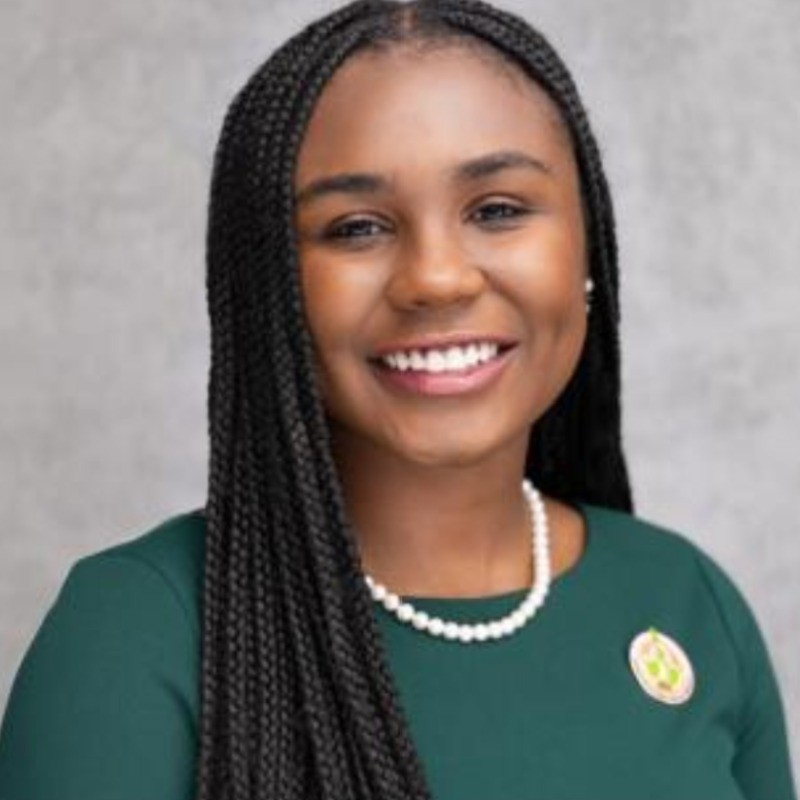
Portrait of Ravon Lingard

Ravon Lingard is a Senior Product Manager at Microsoft and the host of “Girl, Let AI Do It For You.”

She works on Microsoft Copilot Studio, specializing in AI model releases, evaluations, and quality. Simply put, she helps make sure the AI people use every day is rigorously tested, continuously improved, and ready to ship.